Seedance 2.5 vs Gemini Omni 1.1 Flash
One source. Different directions.
Explore the edits, inspect the prompts, and build your own version.
3 shot studies · 1 complete editing workflow
Source clips, saved prompts and original files.
In these selected edits, Seedance delivers a taller house lift and a close T. rex encounter with visible human motion. Omni offers more destruction in the house shot and more visible motion in the raptor shot. Both can change the source performance. Compare the clips, then follow the full editing workflow.
Selected examples, not a controlled benchmark. Different prompts and settings; no overall winner. Read the comparison limits.
These comparisons focus on picture and motion. Playback starts muted; use the player controls for sound. Embedded videos are compressed previews.
Shot study 01 / Gesture & weight
A house lifted by a gesture
Keep the person and the shot. Lift the house, then bring it back down with weight.
Seedance 2.5
6s · 9:16A pronounced lift, a recognisable roofline and cracks across the facade. But the person holds the raised-arm pose later than in the source: the preservation instruction is not fully met.
Open originalGemini Omni 1.1 Flash
6s · 9:16The house tears away with exposed roots, broken steps and a more destructive landing. The person follows the downward gesture more closely, but the sky and building details also change.
Open originalWhat to take from itStart with the Seedance version for the taller, more intact lift; the Omni version for the more destructive interpretation. If the original performance must stay untouched, neither is a finished composite.
What differsSame garden source; different prompts. Both saved examples are 9:16, 6s, 720p and Count 1. These labels describe the saved setup, not a native-resolution measurement.
Shot study 02 / Motion & placement
A creature that belongs in the shot
Add a close raptor, keep the seated person moving, and make the scale and placement believable.
Seedance 2.5
5s · 16:9A close, detailed raptor stays beside the person, but the person’s head and shoulders appear nearly still compared with the moving source. Creature detail does not establish preservation of the performance.
Open originalGemini Omni 1.1 Flash
4s · 16:9The raptor leans toward the person as the view progresses. There is more visible movement through the shot, but proximity, occlusion and the person’s appearance still need a frame-by-frame check.
Open originalWhat to take from itFor this moving source, start your motion-preservation review with the Omni take. The Seedance take is useful for inspecting the creature treatment, not evidence of an unchanged performance.
What differsSame saved lean prompt, same patio source and four image references. Seedance is labelled 5s / 1080p; Omni 4s / 720p. Neither motion cadence nor fine detail can be ranked as an equal-settings test.
Inspect the saved Seedance prompt
Inspect the saved Omni prompt
Shot study 03 / Scale & atmosphere
Scale is part of the brief
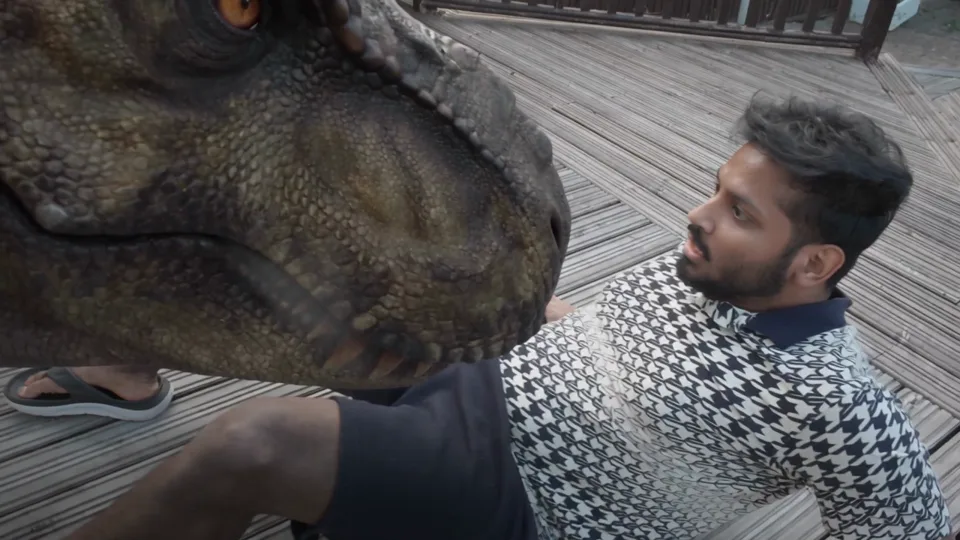
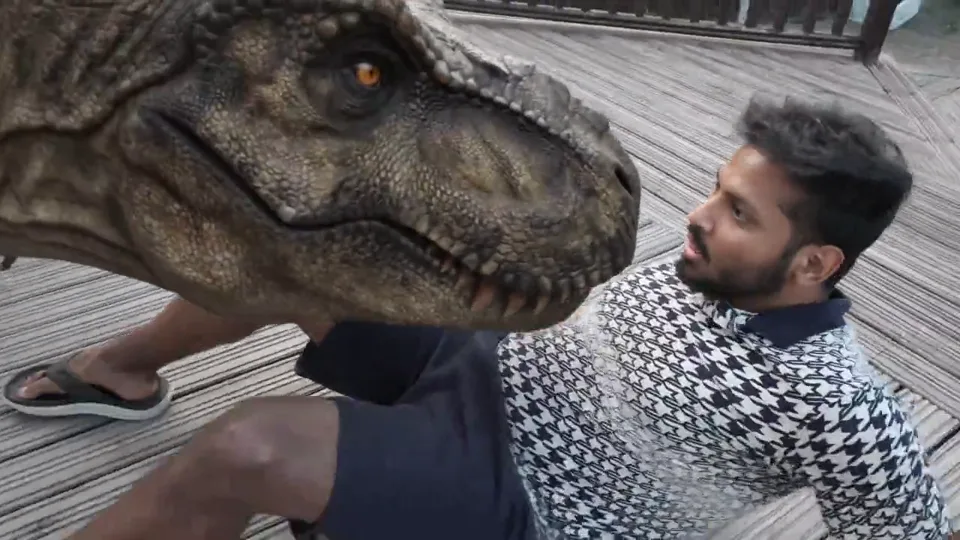
Place an enormous T. rex head over the person’s knees, without replacing the source shot.
Seedance 2.5
4s · 16:9The large T. rex head moves close to the person’s face while the seated person and camera view visibly move. Check its proximity, occlusion and darker lighting against the source; visible motion is not proof of unchanged pixels.
Open originalGemini Omni 1.1 Flash
4s · 16:9The head leans into a brighter daylight scene. Its size, position and interaction with the person differ from the Seedance take. Check both in motion rather than choosing from a poster frame.
Open originalWhat to take from itBoth selected takes show visible human motion. Compare the creature’s scale, placement and mood against the source. The Seedance prompt explicitly allows a darker treatment; that is a creative direction, not an equal-brief test against Omni.
What differsSame patio source and one image reference; both saved setups are labelled 16:9, 4s, 720p and Count 1, but their prompts differ. Seedance allows the image’s dramatic mood. Omni’s “Take 2” instruction is a fragment, not a complete standalone recipe; earlier instructions are not recorded here.
Inspect the saved Seedance prompt
Inspect the saved Omni prompt
From source clip to reviewed output
The complete house-lift workflow
Start with the actual garden clip—not a generated first frame. The source, both saved prompts and both selected outputs are available here. The review and iteration steps below are a recommended way to use that evidence, not a claimed chronological record of the original runs.
- 01
Open the example and restore a setup
Open the public comparison Session. In Good, the first two results are the Omni and Seedance house edits. Choose Reuse Input on the version you want to explore. This restores its saved prompt, model, settings and source—it does not generate.
Or start a Video Session with the original garden clip above. Use media you have permission to upload and edit.
- 02
Give the video the right role
The garden clip must be Edit source. A Reference Video guides a generation; a First Frame starts a new one. Neither means “edit this whole clip.” This house example needs one source video and no extra image reference.
Check the attachment’s role menu. The saved Seedance prompt calls this attachment
@vid1; that mention does not set its role. Use the current@picker if you recreate the setup manually, and check Edit source separately. See the source-role walkthrough. - 03
Inspect the prompt and saved settings
Both selected house examples are labelled 9:16 · 6s · 720p · Count 1. Choose the editing-capable Seedance 2.5 or Gemini Omni 1.1 Flash model and check the controls available now; labels saved with an example are not proof of its native output resolution.
Seedance house lift · saved prompt
Seedance 2.59:166s720pCount 1Edit @vid1 Keep the person exactly as in the original video with identical face, identity, anatomy, clothing, hands, arm movement, timing, pose, proportions, and expression, with no changes or regeneration. As @vid1 raises their arms, the entire house and surrounding ground react with powerful, realistic motion, the house being lifted MUCH higher into the air for a brief moment before settling back down, remaining structurally intact with no collapse or breakage. Show significantly increased but still physically plausible damage on the house and steps, including deeper and more numerous cracks along the walls, steps, and façade, more loose shingles, flexing foundations, chipped and falling plaster, and small pieces of debris breaking off and landing realistically. Allow dramatic but physically grounded VFX like cracking and heaving soil, flexing foundations, shifting debris, dust bursts, subtle shockwaves, and new fractures rapidly spreading across the house exterior, all obeying real gravity and material behavior, no cartoon physics, no rubbery motion, no explosion, no text or logos. Omni house lift · saved prompt
Gemini Omni 1.1 Flash9:166s720pCount 1Edit the original garden video. Preserve the person completely unchanged: identical face, identity, anatomy, clothing, hands, arm movement, timing, pose, proportions, and expression. Do not regenerate, retime, or modify the person. Make the house extremely heavy and structurally connected to the ground. As the person lifts upward, the house must resist before being violently ripped from its foundation. Show concrete cracking and tearing, soil compressing and collapsing, roots snapping, pipes and cables stretching, masonry flexing, roof tiles loosening, and large chunks of earth falling away. The house must move with believable mass and inertia, never float, bounce, wobble, or behave like a soft object. Keep it suspended during the upward arm gesture. When the person’s arms begin moving downward, start the house descending with a short natural reaction delay, then match the downward motion to the gesture. The house accelerates under gravity and gains momentum before a heavy impact. All debris obeys realistic physics: large pieces fall faster and hit harder than dust; concrete chunks rotate, collide, fracture, bounce, and leave impact marks; roof tiles scatter independently; soil crumbles and slides; dust expands after heavier impacts. On landing, show soil compression, foundation collapse, distinct debris impacts, delayed dust eruption, grass bending outward, loose objects bouncing or rolling, and a realistic circular shockwave through the garden. Use restrained impact camera shake, photorealistic live-action blockbuster VFX, realistic scale, gravity, inertia, material weight, and cause-and-effect. No text, logos, extra people, cartoon physics, floating objects, weightless debris, or plush-toy motion. Avoid: Do not alter the person. No face drift, identity change, body morphing, clothing changes, altered hands, changed arm gesture, changed timing, pose drift, duplicated person, extra people, floating house, weightless debris, rubbery structures, soft plush-toy motion, synchronized fake particles, delayed house motion unrelated to the arms, weak impacts, cartoon physics, text, or logos. These are the prompts stored with the public examples, not rewritten “perfect prompts.” Phrases such as “identical,” “no regeneration” and “physically plausible” express intent; they do not certify preservation or simulate real physics.
- 04
Run one version, then inspect the whole clip
Check Count 1 and the current credit estimate before generating in your own workspace. The public Session is read-only; starting a run requires signing in. Keep the source available next to the new output.
- Beginning: did the person, house, sky or framing change before the effect starts?
- Lift: does the house respond to the gesture? Does the person keep moving?
- Landing: do the arms come down when they do in the source? Do architecture and debris remain coherent?
The selected Seedance take illustrates why this matters: a convincing lift can coexist with changed arm timing. A “Good” label is an editorial selection, not a pass on every requirement.
- 05
Change one instruction; keep the original source
Use Reuse Input again to revise the setup. For a cleaner experiment, keep the same source, model and available settings; change one goal. Do not accidentally use the generated result as the next Edit source unless you intend a chained edit.
Suggested next test · not a published result
“Keep the source sky, house design and camera framing unchanged. Reduce the lift and surface damage. Match the start of the descent to the person’s downward arm movement; do not hold the raised-arm pose.”
Review the whole output again. A narrower instruction may still fail; do not treat this untested revision as a proven fix.
- 06
Choose, download and keep the recipe
Open or download the original output from the Session. The videos embedded here are lighter playback previews; the Open original links point to the original files. Retain the source, prompt and model/settings with the version you choose. Inspect the original files for fine detail; preview compression can hide artifacts. An original file is still not proof of pixel-for-pixel source preservation.
If unchanged human motion is non-negotiable, reject a take that changes it—even if the effect looks good. Plan a separate compositing workflow for strict preservation; that finishing step is not demonstrated by this study.
Useful failures
Keep the misses in the comparison.
The Session retains 15 selected “Good” outputs and 15 “Bad” outputs. These are curated groups, not all attempts or a 50% success rate. Here are two reasons to review more than a poster frame.
The house moves, but the brief is not satisfied
Gemini Omni 1.1 Flash
6s · 9:16This retained Omni miss lifts a comparatively clean structure. Compare the foundation separation and landing with the selected take; motion alone does not establish convincing mass or the requested damage.
Open originalA creature in frame is not enough
Seedance 2.5
8s · 16:9This retained Seedance miss places the raptor low across the foreground. Judge its scale and relation to the person’s knees against the brief, then check whether the source performance still moves.
Open originalHow to read this study
Evidence, not a leaderboard.
We compare selected outputs from Creativly’s existing public Session. Model names, input roles, prompts and downloadable assets follow that curated record. The observations describe these clips; they are not claims about every output from either model.
The house examples share a garden source. The dinosaur examples share a patio source, with one T. rex image or four raptor images as appearance references. They are video edits, not demonstrated text-to-video or image-to-video generations.
Inspect the patio source and dinosaur references
Open original patio clipOpen an output’s input references in the interactive Session to inspect and download the images. Their role is visual guidance—not an opening frame or proof of unchanged pixels.
There are no equal-seed logs, complete attempt counts, timed runs or verified provider invoices for this study. Saved resolution labels and “4K HD” inside a prompt are not native-resolution measurements. We make no speed, cost-efficiency or failure-rate claim.
Some T. rex variants in the full Session mention @Video 2 without a second video in the saved references. Others begin with “Take 2” or “Take 4.” They remain available as results, but should not be described as fully documented, standalone recipes. That is why the complete walkthrough uses the house example.
For a fairer comparison of your own: use the same source and reference roles, a self-contained prompt, compatible duration and ratio, and a written review checklist. Save every attempt and record each model’s supported settings. Compare the full clips, not just the best frame.
Practical questions
Which is better for video editing: Seedance 2.5 or Gemini Omni 1.1 Flash?
There is no overall winner in this selected set. The Seedance house take emphasises a taller lift, and its selected T. rex take shows a close encounter with visible human motion. Omni offers different destruction, movement and daylight treatments. Compare the specific shot you need, including source preservation. Different prompts, durations and selection histories prevent a fair overall ranking.
Are these generated videos or edits of existing footage?
They are source-video edits. The garden and patio clips are the edit sources; the dinosaur images guide appearance. This study does not document how the source clips were made, or a product-photo-to-video campaign.
Does “preserve the person exactly” lock the original pixels?
No. It is an instruction, not a guarantee. These examples include altered timing, static performance and changes beyond the requested effect. Play the entire original and output; if pixel-accurate preservation is mandatory, a generative edit alone is not sufficient evidence that the requirement has been met.
Can I reuse the prompts and download the original files?
Yes. The public Session exposes the saved prompts, settings, reference inputs and original outputs. Reuse Input restores a setup without generating. Review references, model, Count and the current estimate before running it in your own workspace. Results will vary; downloading an example does not establish rights to republish every depicted element.